

Gamma AI Review: Is It the Best AI Presentation Tool?
13 min read
09 May 2025
By Aijaz Mughal
Creating a presentation shouldn’t feel like pulling teeth, but it usually does. Between formatting slides, designing layouts, and figuring out what to write, you end up spending hours, only to produce something that still doesn’t feel right.
Whether you’re a busy professional, a student with looming deadlines, or someone trying to pitch an idea last-minute, the stress is real. This is where Gamma AI promises to be a game-changer. It claims to take the hassle out of presentations by letting AI do the difficult part.
But does it live up to the hype?
Let’s dig deep and find out if the Gamma app is truly the best AI presentation tool today, or just another overhyped platform.
What is Gamma AI?
Gamma AI is an AI-powered platform designed to help users create professional, interactive presentations, web pages, and documents in minutes. The idea is simple: input a prompt or an outline, and Gamma turns it into a polished Gamma presentation that looks like you spent hours crafting it. With built-in templates, real-time collaboration, and AI-generated visuals and text, Gamma is positioning itself as the future of modern content creation.
Key Features of Gamma AI
So, what makes Gamma stand out from all the other presentation tools out there? Here’s a closer look at its most impressive features and why they matter:
Instant AI-Powered Presentations
With Gamma, you don’t need to worry about starting from scratch. Just describe your topic, and the AI generates a complete Gamma PPT within seconds. It handles everything from slide titles and content to layout suggestions.
This feature is a lifesaver for anyone working under tight deadlines or juggling multiple tasks. Whether you’re preparing for a last-minute meeting or crafting a university project overnight, Gamma gives you a solid head start.
Stunning Visual Templates
Gamma offers a library of clean, modern templates that adapt intelligently to your content. Unlike traditional tools, where you endlessly scroll through outdated or clunky layouts, Gamma’s templates are built to impress. They’re minimalist, easy on the eyes, and help maintain a visual flow throughout the presentation. These templates take your content from plain to polished with almost no effort.
Interactive Content Options
With Gamma, your slides don’t have to be boring. You can embed videos, add clickable buttons, insert animated charts, or create layered pages, all inside a single Gamma AI presentation.
These interactive elements keep your audience engaged and invested, whether you’re delivering a sales pitch, an online class, or a project proposal. Gamma is especially useful for those who want to turn passive viewers into active participants.
Easy Customization & Editing
While Gamma gets you 80% of the way there, it gives you full freedom to customize the rest. You can change fonts, styles, colors, icons, and even the structure of slides. Everything is editable to fit your tone, message, and branding.
Whether you’re working solo or with a PowerPoint designer in Dubai, Gamma makes it easy to take control and personalize your slides without needing advanced design skills.
Real-Time Collaboration
Gamma supports real-time collaboration, just like Google Slides. Team members can join, comment, and edit simultaneously, making it ideal for group projects, corporate teams, and agencies. You no longer have to deal with long email chains or multiple slide versions. Everyone stays on the same page, literally!
Multilingual Support
Presenting to a global audience or creating content in different languages? Gamma supports over 80 languages, making it a smart choice for international teams or diverse audiences. This feature is especially useful in multicultural cities like Dubai, where creating regionally appropriate content is often a necessity.
How to Use the Gamma App to Create a Presentation
Getting started with the Gamma app is refreshingly simple, even if you’re not tech-savvy. Here’s how you can create a powerful presentation in just a few minutes:
Step 1: Sign Up or Log In
Visit gamma.app and sign up using your email or Google account. Once you’re in, you’ll land on a clean dashboard ready for action.
Step 2: Click ‘New Document’
Select the type of content you want to create: a presentation, a document, or a webpage. For a slide deck, choose the presentation option.
Step 3: Type Your Topic or Prompt
This is where the magic happens. Just type in a simple topic, like “Marketing Strategy for 2025,” or paste your outline. Gamma’s AI will instantly start generating a full Gamma AI presentation with suggested slide titles, descriptions, and layouts.
Step 4: Customize and Polish
Once your draft is ready, you can customize each slide, change text, update visuals, add branding colors, tweak layouts, or insert interactive elements like videos and buttons.
Step 5: Share or Export
When you’re done, you can present directly from the Gamma interface, share a link with others, or export your Gamma PPT as a PDF or PowerPoint file. Perfect for quick meetings or polished client presentations.
(Pro Tip: If you’re based in Dubai and need more advanced branding or storytelling, consider teaming up with a PowerPoint designer in Dubai to refine your Gamma draft into something extraordinary.)
How Gamma Compares to PowerPoint
Let’s be real, PowerPoint isn’t dead, but it can feel dated. Here’s how Gamma stacks up:
| Feature | Gamma AI | PowerPoint |
| Speed | Generate slides instantly | Manual slide creation |
| Design | Modern, sleek templates | Requires manual styling or external templates |
| Collaboration | Real-time team edits | Limited, not as seamless |
| Interactivity | Built-in buttons, layers, videos | Mostly static unless heavily customized |
| Learning Curve | Minimal | Moderate to high |
If you’re used to PowerPoint but feel it’s slowing you down, Gamma might be the breath of fresh air you need.
(Check this out if you are looking for powerful corporate PowerPoint templates.)
Who is Gamma AI Best For?
Gamma AI works well for people who want to create clean, professional presentations without spending too much time on design or formatting. Here’s who usually finds it most helpful:
- Busy professionals who need to prepare for meetings or client pitches quickly. If you’re short on time, Gamma can generate a full deck while you focus on other tasks.
- Students and teachers who need to make presentations for class. It’s useful for lectures, group projects, or assignments where you want the slides to look polished but don’t want to spend hours designing.
- Marketing teams that often create pitch decks, campaign summaries, or reports. Gamma helps put ideas together fast and gives them a clean, modern layout.
- Entrepreneurs or small business owners who are preparing to pitch an idea or share their business plan. You don’t need to hire a designer, Gamma can create something presentable in minutes.
- Remote teams that work from different locations. Everyone can edit or comment on the same presentation in real time, which makes collaboration easy.
Who is Gamma AI Not Ideal For?
While Gamma is great for making quick, clean presentations, it might not be the right fit for everyone. Here are a few cases where it may not work so well:
- If your presentation needs very specific design work, like custom animations, complex layouts, or strict branding rules, you might find Gamma’s design options a bit limited.
- For high-stakes or heavily tailored storytelling, like investor pitches or corporate decks with a strong narrative, you might get better results by working with a professional.
- If you often work offline or with limited internet, Gamma might not be the best choice. Since it’s a cloud-based tool, you need a steady connection to use it properly.
- In industries with strict design or compliance rules, such as legal, medical, or finance, you may need more control than Gamma currently offers.
In short, Gamma is fantastic for speed and convenience, but not the perfect fit for every use case.
Pros & Cons of Using Gamma AI
Like any tool, Gamma AI comes with its strengths and limitations. If you’re considering using it, here’s a quick look at what works well and what might be challenging:
Pros
- Fast and simple to use: You can create a full presentation in minutes, even if you’re starting from scratch.
- Perfect for tight deadlines: Great when you need to put together a Gamma presentation quickly without compromising on looks.
- No design skills needed: The app handles layout, fonts, and structure for you, which makes it beginner-friendly.
- Interactive elements: You can add buttons, videos, and charts to make your slides more engaging.
- Clean, modern layouts: Templates look polished and professional without feeling outdated.
- Multi-language support: Works well if you’re creating content for a global or multilingual audience.
Cons
- Not built for advanced animations: If your presentation needs complex transitions or layered effects, Gamma might feel limited.
- May require manual edits: Especially if you have specific branding needs like logo placement, fonts, or color schemes.
- Cloud-only access: It’s not ideal if you need to work offline or in low-connectivity environments.
Pricing Breakdown
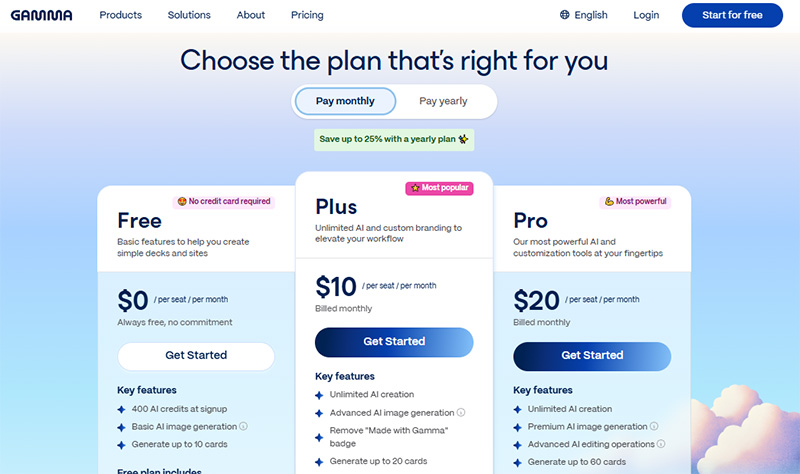
Gamma offers three pricing plans depending on your needs and how often you plan to use it:
- Free Plan – Gives you access to basic features with limited exports. It’s a great way to try the Gamma app and see if it fits your workflow.
- Plus Plan
- $10/month on a monthly basis
- $8/month when billed yearly
Includes premium templates and full export capabilities for users who want more customization without going overboard.
- Pro Plan
- $20/month on a monthly basis
- $15/month when billed yearly
Ideal for professionals and teams, this plan gives access to advanced features like analytics, brand kits, and priority support.
(Note: You can save up to 25% by choosing an annual subscription.)
No matter which plan you start with, you can always begin on the free version to test the waters before upgrading.
Real User Feedback for Gamma AI
Gamma AI has received a lot of attention for how quickly and easily it helps people create clean, modern presentations. Many users love how simple it is to generate a well-structured Gamma presentation without dealing with complex design tools. Compared to traditional tools like PowerPoint, Gamma feels faster, fresher, and more interactive.
That said, the experience isn’t perfect for everyone. Some users mention that while Gamma does a great job of laying the groundwork, you’ll still need to fine-tune the slides, especially if you’re working with brand-specific content or more niche topics.

User Ratings from Around the Web:
- Product Hunt: 4.8/5 (124+ reviews)
- Trustpilot: 3.0/5 (8+ reviews)
- Futurepedia: 5/5 (17+ reviews)
- Microsoft Store: 4.5/5 (80+ reviews)
So, Is Gamma AI the Best AI Presentation Tool in 2025?
If you need fast, good-looking, and interactive presentations without the hassle, Gamma AI is absolutely worth considering. It might not replace PowerPoint for every use case, especially if you require deep customization, but for 80% of presentation needs, Gamma gets the job done faster and smarter.
If you’re in Dubai and want that human touch for an important event, pitch, or business proposal, working with an experienced Aun Digital‘s PowerPoint designer in Dubai could still be the better choice.
Final Thoughts
Gamma AI is more than just a trendy new tool. It’s a smart solution for anyone tired of wasting time on presentation slides. Whether you’re building a client pitch, a school project, or an internal report, the Gamma app can help you do it faster, better, and with less stress.
But for presentations that really need to shine, custom branding, storytelling, or animation, it’s worth reaching out to a seasoned PowerPoint designer in Dubai to take your deck to the next level.
FAQs
What is Gamma AI used for?
Gamma AI helps users create presentations, web pages, and documents quickly using AI-driven tools.
Can Gamma replace PowerPoint?
Not entirely, but it’s an excellent alternative for quick and polished presentations.
Is Gamma AI free?
Yes, there’s a free plan. Premium features come with paid plans.
Does Gamma AI support exporting to PowerPoint?
Yes, you can export your Gamma PPT into PowerPoint or PDF.
How does it help professionals in Dubai?
It saves time, offers localized language options, and is a handy tool for freelancers, agencies, and even a PowerPoint designer in Dubai looking to speed up their workflow.
Author
Aijaz Mughal is a digital marketing strategist, business growth advisor and Founder & Managing Director of Aun Digital. With more than 15 years of experience in the UAE market, he has worked across SEO, PPC, performance marketing, digital strategy, social media, project management and team leadership.Throughout his career, Aijaz has worked with leading brands including Emaar, Masdar, Honda, Leejam, Unilever, The Dubai Mall, Emerson, Moorfields and Yamaha, helping businesses develop effective digital strategies and achieve measurable growth.
Speak to an Expert